
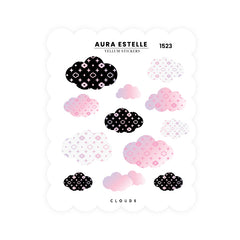
Washi Stickers | Clouds

Washi Stickers | Clouds
Frequently Bought Together
Availability
Shipping & returns
Shipping
Free standard shipping on $80 USD or more in the US and $100 CAD or more in Canada, counted per package. Otherwise US shipping starts at $9.95 and Canada at $6.95. International rates show at checkout.
Standard delivery usually takes about 2 to 10 business days.
Returns
Regular items can be returned within 14 days of delivery. Email care@auraestelle.com. Return postage and original shipping aren't refunded.
Final sale, no returns or exchanges: paper products (planners and inserts), personalized orders, pre-orders and Oops items.
Full details: Shipping policy and Returns policy
STICKER: adorable luxe patterned clouds. Perfect for layering and as a single decorative sticker.
SIZE: 4.5"X 3.5"
MATERIAL: Repositionable washi sticker paper. Kiss cut.
LAYERING: Stickers are semi transparent which is great for layering.
PEN FRIENDLY: Yes, can be written on with pen, fountain pen, brush pen etc.
Using planner stickers in a clean setup
Planner stickers work best when they support the way you already plan. Use scripts, tabs, dots, trackers, headers, washi boxes, and decorative stickers to make spreads easier to scan without covering the writing space you need for appointments, notes, and memory keeping.
Choose stickers that match the layout first, whether you use daily pages, weekly vertical columns, monthly spreads, trackers, or notes pages.
Headers, dots, tabs, and scripts can make a planner easier to read when they label sections instead of crowding the page.
A few repeatable sticker styles are easier to use consistently than a large stack that never makes it into the weekly setup.
Planner sticker FAQ
Start with the layout you use most often, then choose labels, scripts, dots, headers, or boxes that make the spread easier to scan.
Date dots, day headers, trackers, tabs, scripts, and checklist shapes are useful when you want structure without rewriting the same labels every week.
Yes, especially if many layers are added to the same page. Use stickers where they help navigation or memory keeping, and keep heavy layers away from the planner spine.
Try one weekly or monthly setup first. Check whether the sticker size, color, and adhesive feel good before using it across a full planner stack.